Showing posts with label Computer Tips. Show all posts

Monday, November 29, 2010

Letting go...

     It's been a long time ago since we thought of replacing our old desktop pc with a brand new laptop. I was so hesitant at first because of its sentimental value. That old pc was the first thing I had bought using the money I earned from my first job which was about 5 years ago. It's indeed a tough machine, isn't it? I still remember how excited I was when I started to assemble and build it from scratch. Though now, it's old and ugly, the performance is still great. We only used it for internet surfing and blogging so we didn't bother to upgrade its specifications but recently we decided to change it for the better. We got one of the Asus models - Asus K42F-VX020 from one of the pc stores in Mall of Asia. One of the advantages of having this new laptop is that we can maximize the space for our small condo unit. If you think that we will let this old machine to retire now, you are certainly wrong, haha, 'coz I had a plan of giving it to my younger brother in province so he can use it for his studies.

     Anyway, I created this blog because I want to share with you the specifications of this Asus - K42F-VX020. It may be helpful to others who are currently looking for a notebook for their personal use. Specifications are not too high but my husband had been through a lot of local stores and Malls here in Manila and this one was found to be the most suitable for us in terms of performance and quality and of course, price (got it only for Php 29,995.00) ^__^. Maybe you wanted to give yourself a gift this Christmas or give your loveones laptop as a gift this Holiday season, you may add this to your choices. We had tested it already for 2 days and so far, we are satisfied and impressed with its overall performance. The palmrest does not heat up even if you use the machine for a long period of time (in our case, we had tested it for 8 straight hours and the temperature remains constantly lower at the palmrest area). Also, with its "chiclet-design" keyboard, we feel more comfortable when typing; it helps us improve our typing speed with accuracy.


Additional Features:
Wireless 802.11n + BT
DVD Super Multidrive
0.3 Megapixel Camera
SD/MMC card reader
HDMI port
free bag
No bundled OS


     Finally, we're letting go of our old desktop computer to welcome the new Asus laptop!!! 
Btw, don't forget to buy a router if you don't have one yet, so you can enjoy surfing the net using wireless connection at home :)


Tuesday, November 23, 2010

The user profile service failed to log on user profile cannot be loaded

Just want to share this fix which was proven to work for both Windows Vista and Windows 7 Operating System.

Log on with another administrator user profile or if you don’t have any other and you are the only user, do the following:

1. Turn off computer

2. Turn on computer and press F8 while you see the DELL logo
3. On the Windows Advanced Options select Safe Mode and log in to your account. You can go ahead and try system restore back to when the computer was still working ok (this works as well), but if you are comfortable enough to navigate on the registry, i recommend that you follow the next step
4. Open the Start Menu and type Regedit on the Start Search field
5. Go to the following entry:
a. HKEY_LOCAL_MACHINE\Software\Microsoft\Windows NT\CurrentVersion\Profile List
6. There you will find the following information:


7. On the “.BAK” file you will find an entry with ProfileImagePath with the name of the user.
8. Delete the repeated entry that does not contain “.BAK”
9. Right click on the other entry and select Rename. Delete the extension .BAK for the original entry.
10. Exit Regedit
11. Restart computer.

Monday, October 18, 2010

Access your Facebook chat without logging in to Facebook.com

Are you asking if it is possible to access your facebook chat without logging in to your facebook account? Well, the answer is yes.  This was made possible by Pidgin software. So, if you are interested to know how to use the facebook's chat feature without logging in to facebook.com,  read through this blog and I will show you. I  had tested this software on my own computer and was proven to work with no issue at all. You can even use your yahoo chat and facebook chat simultaneously. This software is easy to use and is very convenient. You don't have to wait for the internet browser to load. Once the Pidgin software is installed, you can start setting up multiple accounts and begin chatting. Just place the icon on your desktop or to your taskbar so that next time you need to chat with your friends, you just have to click the pidgin icon and you're ready. It will help you save a lot of time.

Just follow the steps below:

1. Download Pidgin software.
2. Log in to Facebook.com. Setup Facebook Username in Account settings.
3. Open Pidgin.
4. Click on Account Tab then Manage Accounts then Add


5. Type in the following info:


Note: Above steps are for users with Windows OS. For Mac & Linux users, you can download Pidgin software here.

Saturday, October 16, 2010

Facebook added new security features

I experienced problem login in to my Facebook account last October 13, 2010. Other sites like yahoo and google mail were ok. So to make sure that my facebook account was not hacked, I tried to log in using my husband's account but I kept on getting this page as a result:


3 Awesome screenshot capture tools

PrintScr button in the keyboard is one of the most commonly used tools  to capture the screen in Windows desktop. Now, there are hundreds of software that we can use to capture the screen. In this blog, I will feature my favorite screen capture software. This might help students for their reports and bloggers like me for their posts.

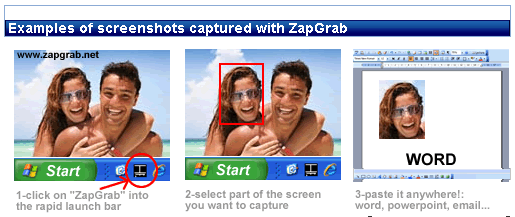
1.) Zabgrab -  is a small but effective screenshot capture tools. You will be able to copy everything that appears in your monitor, as easy as taking a photo. It allows you to capture screen of two ways: the complete screen or a section of the screen with a quadrangular form delimited by you with the mouse. No installation is required.

Via Zapgrab.net
Based on their website, it costs $6.99 for Windows Vista & 7 but I was able to find a free version of it from here.

Friday, October 8, 2010

How to get saved passwords in Mozilla Firefox

According to wikipedia, Mozilla Firefox is the second widely used browser in the world. It is a free and  open source web browser managed by Mozilla Corporation.  Since it was first released last September 23,2002, Firefox had gained popularity and had continuously increased its share after Microsoft Internet Explorer. It is highly recommended because it has lesser security vulnerabilities than Internet Explorer. Some of its features are tabbed browsing, pop-up blocking, spell checking, private browsing, download manager and live bookmarking.
You can also choose to save your password if you are logging in to Yahoo, Facebook, Twitter and other similar sites.
Mozilla Firefox is very convenient for a single user, but also risky for a shared computer. Why did I say so? Because if you choose Mozilla Firefox to remember your password, it is very easy for others to know what it is even without using any third-party software. Here's how:

Wednesday, September 29, 2010

How to identify if an email is safe using sender's IP address

(Track an E-mail source and location and sender's IP reputation)

Have you ever wondered how FBI or Police track hackers location? Or were you curious about where the spam email are coming from especially those with unknown senders? You should be! You may not be aware but there is a big possibility that one of the spam emails you got contained virus. Hackers can actually send malicious files to your computer and can run in the background without you noticing them. Most of the times, viruses are spread through emails in a form of attachments.

In this blog, I'll show you how you will be able to trace the sender's IP address and location and how to check the sender's reputation through his IP. Actually, once you subscribe to an internet company, you will be given a unique IP address by your service provider (ISP). To know your unique IP address, you can go to this link www.whatismyipaddress.com. Everytime you log on to your email account, the email provider will have a log of your IP address in their servers. 

So out of curiosity, I tried tracing the source of one email in my inbox. If you want to do the same, you can follow the procedures below:

Sunday, September 26, 2010

Best tool to change your Windows 7 log on screen background

If you are tired of the usual win7 log on screen and  wanted to change it to your own picture or your favorite image, I recommend that you use this excellent tool which I discovered recently. Instead of going through a complicated process of editing the registry, this one is very easy to use.
Just download the
Windows 7 Logon Background Changer to customize your welcome screen wallpaper.

Here are some of the advantages according to Julien Manici:

  • It does NOT change any system file, and the program itself does not requires admin rights to run : it will just ask you to run as admin a very simple cmd file that creates the required folder and registry key with the appropriate rights. Any user of the computer will then be able to change the Windows 7 logon screen wallpaper. You can also prevent users from being able to change the logon screen wallpaper if you don't want them to be able to modify it without administrator rights (option available by clicking on the "Settings" button).

  • It creates a few JPEG files based on the image you want to put as wallpaper for the Windows 7 login screen, applies the appropriate cropping and sizing and saves them using the best compression quality possible.
Download Here

Thursday, September 16, 2010

Disable "write function" in any USB storage devices

Do you want to prevent illegal copying of  files in your computer? This tiny tool will help you to do that. Just run the program,click enable write protect and your done!


USB Write Protect is a standalone program to protect your data from accidental deletion, modification and copying of your files in USB devices like flashdrive.  Download here.
To manually do it, copy the registry value below. Paste it in the notepad then save it as WriteProtect.reg. Right click the file then select merge.

Windows Registry Editor Version 5.00

[HKEY_LOCAL_MACHINE\SYSTEM\CurrentControlSet\Control\StorageDevicePolicies]
"WriteProtect"=dword:00000001


To disable write protect change dword to 00000000 


Wednesday, September 15, 2010

How to protect/ hide your files without third party software

I've read a very good post recently in www.techtipsgeek.com, on how to protect your data without the use of any third party software. It is a simple trick to hide your confidential or private folder in just one click. Just follow the steps below.


1. Open notepad then copy and paste the following codes:

cls
@ECHO OFF
title Folder Confidential
if EXIST "Control Panel.{21EC2020-3AEA-1069-A2DD-08002B30309D}" goto UNLOCK
if NOT EXIST Confidential goto MDLOCKER
:CONFIRM
echo Are you sure you want to lock the folder(Y/N)
set/p "cho=>"
if %cho%==Y goto LOCK
if %cho%==y goto LOCK
if %cho%==n goto END
if %cho%==N goto END
echo Invalid choice.
goto CONFIRM
:LOCK
ren Confidential "Control Panel.{21EC2020-3AEA-1069-A2DD-08002B30309D}"
attrib +h +s "Control Panel.{21EC2020-3AEA-1069-A2DD-08002B30309D}"
echo Folder locked
goto End
:UNLOCK
echo Enter password to unlock folder
set/p "password=>"
if NOT %password%== 12345 goto FAIL
attrib -h -s "Control Panel.{21EC2020-3AEA-1069-A2DD-08002B30309D}"
ren "Control Panel.{21EC2020-3AEA-1069-A2DD-08002B30309D}" Confidential
echo Folder Unlocked successfully
goto End
:FAIL
echo Invalid password
goto end
:MDLOCKER
md Confidential
echo Confidential created successfully
goto End
:End

2.   Then click on File ----> Save as and name it as “Key.bat” (without the quotation marks). 

3. Go to the location where you saved the file and double click on "Key" icon. When you open it for first time, a folder “Confidential” will be automatically created. You can move all your confidential data in that folder.


To lock the Confidential folder, just double click on the "Key" icon. A confirmation message will appear. Type “y” then press enter. That will also make the folder “Confidential” hidden to everyone.


If you want to show/access the contents of the Confidential folder, you just have to double-click on the "Key" icon. You will be prompted to enter your password.


The default password is "12345". It is advisable to change your password so others who knew how to use this trick will not be able to access the Confidential folder. After that, compile the "key" file using bat to exe converter to avoid viewing  your password.


How to convert bat to exe file:


Step 1. Download bat to exe converter

Step 2. Run the application and put the source path of the batch file(Key), then specify the location where you want to save the exe file.


Step 3.  Click the compile button. 
Step 4.  Delete the "Key" icon.


Monday, September 13, 2010

How to recover your deleted files

Did you accidentally format your SD card, USB drive or External Harddrive? Or did they get infected with virus and suddenly all your files were gone? Yes I experienced the same..it was so painful losing all your valuable files  especially if you don't have any back up of your important data. But don't worry, because those deleted files  can be recovered now with some powerful tools as long as you did not overwrite them yet.  I  had used 5 recovery software so far and I will share to you the results of the recovery.
                
 Test 1 - Deleted a folder in my desktop named Recovery test.
 Test 2 - Formatted my Memory Stick which I used with my Sony digital camera.


TEST 2
  TEST 1
version 3.2.13
Restoration - is a free recovery software developed by Brian Kato.  It is a small, easy to use and straight forward tool capable to recover files which was already removed in the recycle bin. It can even recover pictures from formatted media devices.

Pros : Free,  can run without installation
Cons : Lack of interface, Limited capalities
Test 1 result - not recovered
Test 2 result - recovered

Recuva - is another free program developed by Piriform.
version 1.38.504
This is my favorite recovery software because 
it's easy to use. Recovery process is also faster compare to other tools I tested.
It can recover deleted data from your hard drive such as emails, documents and pictures.
It can also restore deleted music from your ipod.

Pros : Free, Good interface
Cons : Cannot preserve files location
Test 1 result - not recovered
Test 2 result - recovered


VERSION 3.2
File Scavenger - will charge you around $49. You can try the trial version but it won't let you recover the files, it will just let you view them. 

Pros : Fast Scan
Cons: Cannot customize the search in folder level
TEST 1: unable to search the file (trial-version only)
TEST 2: was able to find the deleted files (trial-version only)

GET DATA BACK -  is more expensive rather than File Scavenger and Recover my Files. There are 2 versions of Get data back software: GET DATA BACK NTFS  which you can buy at $79 and GET DATA BACK FAT which costs $69. You cannot use the NTFS version to recover files in media devices like USB, SD and Memory Stick.

Pros : Has indicator for deleted files
Cons: Slow Scan, Expensive
TEST 1: unable to search the file (trial-version only)
TEST 2: was able to find the deleted files (trial-version only)

Recover My Files  - has a very good interface and is very user-friendly. It automatically detects number of files deleted in specific folder. You can also customize the search options in folder level, and not to scan the whole drive every time you want to recover a file. This costs $69.95.

Pros : Fast scan and effective
Cons: Expensive
TEST 1: was able to find the deleted files (trial-version only)
TEST 2: was able to find the deleted files (trial-version only)

Conclusion: In my personal experience, Recover my Files was the only one that passed both tests. However, in recovering your data after deletion, there is no guarantee that you will be able recover them all. You can try the software listed above but there's always a 50/50 chance. It is still recommended to always have a back up of your data to prevent data loss in case of media failures and accidental deletion.

Thursday, September 9, 2010

How to improve your PC's performance

Had your computer gone slower lately? I have here some tips for you on how you can boost the performance and enhance the speed of your pc.
 

1.)     Antivirus.  Check how many antivirus you have. Make sure not to install more than one antivirus because it will just consume memory and will slow down your computer. Use antivirus that consume less memory.

You can try Antivir free edition


2.)     Spyware.    Check your computer for spyware, install anti-spyware and scan your computer in safemode. Most antispywares are available for free.


3.) Startup. Remove unnecessary startup programs. Click START RUN and type MSCONFIG. Uncheck load startup items or manually select programs that you need under startup tab.


4.)  Menushowdelay. You can tweak the speed of startup item in the registry. Click Start, click Run, type regedt32, and then click OK.


Navigate to HKEY_CURRENT_USER\Control Panel\Desktop  and at the right pane double click  Menushowdelay then change the value to 2. Make sure to restart the computer for the changes to take effect.


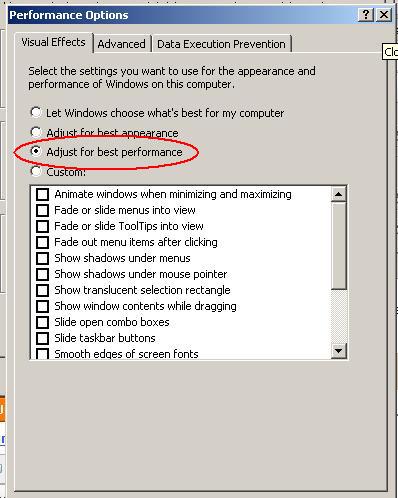
5.) Virtual Memory.  Virtual memory is an area on the hard disk that Windows uses as if it is RAM. Windows requires this type of system in the event that it runs out of physical RAM. Go to control panel, double click system, click ADVANCED, under performance click setting


                         under visual effect click adjust for best performance


                       Then go to ADVANCED tab, click on Virtual Memory
                                              and click Change


Set it to the maximum size (Size of physical RAM installed multiply by 1.5). Restart the computer for the changes to take effect.


6. Defrag.  Disk Defragmenter locates and consolidates fragmented boot files, data files, and folder on local volumes. It is one of the best solution to speed up the computer. However, this is time consuming that's why a lot of users choose not to do it. If you have time, try to defrag your computer at least once a week. To run disk defragmenter : Go to START, Program Files, Accessories system tools and disk defragmenter.


WINDOWS XP DEFRAGMENTER
WINDOWS 7 DEFRAGMENTER


Wednesday, September 8, 2010

How to download MP3 Songs for Free


Are you a Music lover? Here are some tips on how you can download free MP3 online. Enjoy!

      1.) Go to  www.super-mp3-download.com                
      Download the program & install it to your computer.
      Just type in the title of the song and artist and your done.
      
      
      Features:   
                    Over 100 Million MP3 For Free
                    Bring You The Hottest Songs
                    Listen To Music Online Without limits


 2.) Go to  www.musicdumper.com         
      Just type in the title of the song and artist. 
      Select from the search result.(it will automatically play)
      Right click the song from DOWNLOAD MP3 & select save target as.


3.)  Go to  www.mp3raid.com             
      Just type in the title of the song and artist. 
      Select from the search result.You will be required to input the code in some files.
      Right click the song from DOWNLOAD MP3 & select save target as.
      ( If the song won't play, just select another one from search result)


Some of my favorite albums.
Related Posts with Thumbnails